Halaman

Kamis, 29 November 2012

Tugas Pemrograman Terintregasi


Tugas Pemrograman Terintregasi

Nama  : Nurul Ariesta
NPM  : 1057201000774
Kelas  : B-malam
Semester V (lima)

Days 1 Print Screen :

http://www.mediafire.com/view/?oes4ka0844qrw1j


Days 2 Print Screen :

http://www.mediafire.com/view/?l7rtortg6egp77m


Days 3 Print Screen :

http://www.mediafire.com/view/?zn78aslo3v1xznd


Days 4 Vidoe Tutorial :

http://www.mediafire.com/?522d24f69uvwzt2


Read More..

Senin, 19 November 2012

TUGAS UTS MATA MATA KULIAH SYSTEM OPERASI

Nama      : Nurul Ariesta
Nama      : 1057201000774
Kelas      : B malam
Semester : V

Pleace clik here
http://www.mediafire.com/view/?u83hjfpckgt0a91


Read More..

Minggu, 05 Februari 2012

TUTORIAL NEUNDO 4


Software keluaran Steinberg ini berfungsi di tujukan untuk Profesional Recording…. akan tetapi tidak di luar kemungkinan Nuendo 4 dapat di gunakan tuk hal sederhana dalam pekerjaan…. misalnya tuk dalam pembuatan SQUENCER… dimana software ini banyak digunakan oleh kalangan anak band tuk membuat demo mapun hal yg saya bilang tadi…..
oke kita mulai saja… karena anda pasti dah tidak sabar tuk mengetahuinya…
Disini saya menulisnya untuk tutorial membuat SQUENCER / SAMPLING yg di gunakan untuk back up music sound, lagu- lagu party atau rnb ataupun music yg gak mungkin di jangkau dengan keterbatasan personils ( band cafe )
langkah pertama yang harus anda lakukan adalah dengan membuka new project atau pekerjaan baru/ thalaman baru,, terserah lah anda mau mengartikan apa,, pokoknya gambarnya seperti ini :


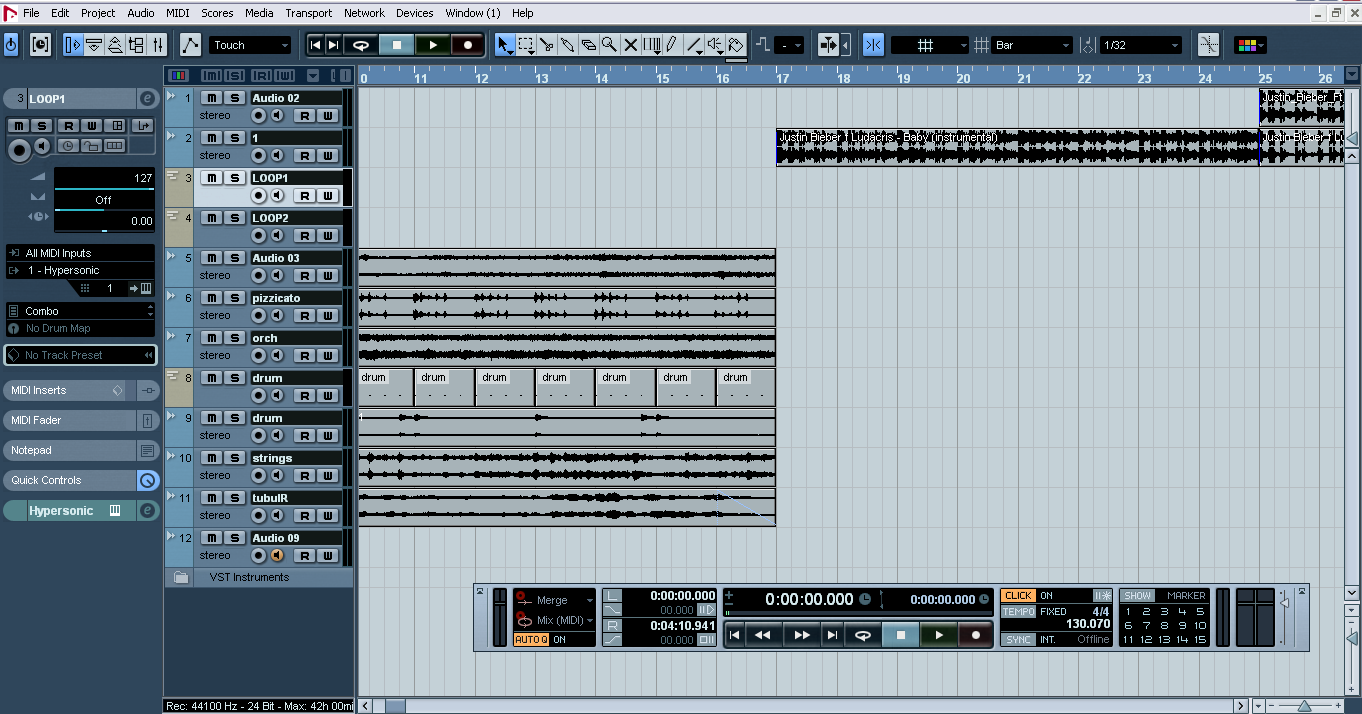
jangan lupa pastikan tombol metronom dah aktif… dan pada tulisan tempo menunjukkan tulisan FIXED, saya juga menyarankan anda tuk mencari birama lagu tersebut… disini saya memberikan contoh 4/4 dengan tempo 130.070. . setelah guide terdeteksi dengan metronome secara benar… selanjutnya kita memasukkan file midi atau pun wafe yg akan kita gunakan sebagai drum… disini untuk project SQUENCER BABY.. saya menggunakan midi sebagai drumnya dan memasukkan file2 yang sudah saya buat di software lain dengan format wave. untuk contohnya seperti gambar berikut :


sudah di lihatkan friend ????
nah untuk penjelassannya, di track 1 saya gunain sebagai guide, di track 2 file yang saya inserta berupa wave, yg saya gunakan sebagai sound synth… untuk pembuatannya saya menggunaklan software lain
di track midi, saya gunakan untuk drum dan pizzicato strings….. yg saya gunakan sebagai komposisi mini untuk orchestra… cara membuatnya dengan mengklik gambar pena atau pensil dan membuat drag jarak bar yg akan kita buat. setelah di buat. tinggal bro double klik dan terbuka piano roll, nah di piano rool itu kamu membuat notasinya… dengan Quantize yg anda tentukan sendiri
setelah semua project baik dari audio track dan midi track telah selesai,, saatnya melakukan mixing atau mebalancekan, 1 track dengan track lainnya, dengan membuka mixer… atau secara cepat, dengan menggunakan aplikasi yg di samping track yg ada pilih. untuk contoh mixernya seperti ini :


jadi setelah  dibuka new project anda akan mendapatkan halaman yg kosong, untuk mengisinya kamu tinggal memasukkan track baru. atau ada tinggal mengklik file dah pilih import, setelah terbuka folder computer anda, anda tinggal memilih file yg akan di jadikan guide, untuk membuat Squence lagu tersebut……
selanjutnya apa yg harus dilakukan ?????
Hal yg harus anda lakukan adalah melakukan pencarian tempo, dan mengaktifkan metronom dengan mengklik tulisan klik di navigator hingga berwarna orange… seperti gambar ini : http://ferrysiregar.files.wordpress.com/2010/06/nuendo-new-project.png


Setelah terbuka, kamu tinggal menurunkan dan menaikkan volume untuk membalance semua track,, untuk editing mastering, saya akan membahasnya lain kali… setelah selesai melakukan balancing, kembali ke project depan nuendo4… kamu harus melakukan penarikan terhadap kursor dari kiri ke kanan hingga batas akhir bar lagu tersebut… dan lakukan export file melalui menu file,,, kamu itnggal memilih mixdown berupa wave atau lainnya……

http://www.youtube.com/watch?v=UixQbcxx17s

Read More..

Rabu, 01 Februari 2012

SCREEN LAYOUT DAN DESIGN


PRINCIPLES AND GUIDELINES
The designer must decide:
       What to put on the screen.
       Where to put things on the screen.
       How to put things on the screen.
1.       General Layout
2.       Text
3.       Numbers
4.       Coding techniques
5.       Color

1.       General Layout
       Include only information essential to decision making.
       Include all information essential to decision making.
       Start in the upper-left corner.
       Design formatting standards and follow them consistently in all
    screens within a system.
        Group items logically.
       Provide symmetry and balance through the use of white space.
        Avoid heavy use of all-uppercase letters.
        Distinguish Captions and Fields.
     Name : John F.Kennedy

2.     Text
·         Three kinds of text:
1. Messages
2. Instructional prompts
3. Instructions.

Messages
             NO
Bad Messages
Good Messages
       1
The processing of the text editor
yielded 23 pages of output.
Output 23 pages.
       2
Error in Dress Size field.
Error : Dress size range is 4 to 16.
      3
Cannot exit before saving file.
Save file before exiting.
      4
Bad / Illegal / Invalid File name.
Max file name : 8 char.
      5
Syntax Error 210.
Unmatched left parenthesis in line 210.
      6
Enter Command.
Ready for command.

Instructional prompts

No
Bad Instructional Prompts
Good Instructional Prompts
1
Position cursor and press return.
Position cursor
Press return to accept.
2
SIZE : ...
SIZE : … (4 to 16)
3
The message is sent by pressing TRANSMIT
To send message PRESS TRANSMIT
4
Don’t return to menu before completing entry.
Complete entry before returning to menu
5
Page forward after entering address.
Enter address, then page forward.
6
Press backtab to go up Tab to go down.
To go up, Press BACKTAB.
To go down, Press TAB.
7
Press U for up
Hit D for down
For up, Press U
For down, Press D

Instructions.
       [Galitz,1985]:
1.         Use short sentences and simple and familiar words.
2.         Keep paragraph short, and separate them by at least on blank line.
3.         Limit lines to 50-55 char/line, or use two double columns 30-35 char/column.
4.         avoid hyphenation (word separating).
5.         Avoid right justifying with unequal spacing.
·         [Tullis,1988] adds some others:
1.       Space between lines should be equal to or slightly greater
2.       than character height (approximately double-spaced).
3.       Avoid line lengths of less than 26 characters.


3.       Numbers
·         Right justify
·         Decimal-align real numbers.
·         Avoid leading zeros when they are unnecessary and nonstandard.
·         Break up long numbers into groups of three to four digits. Use
·         standard separators when they apply; otherwise use spaces.

4.       Coding Techniques
·         Use attention-getting techniques appropriately.
·         Use blinking when you must get the user’s attention and his or her
§  eyes are likely to be directed elsewhere.
·         Use bold text for: title, caption, and warning, maximum three
§  different levels.
·          Use reverse video for choices or errors.
·         Use different size for relative quantity or importance (max 5 level).
·         Use two to four different character types in consistent ways.
·         Use underlining to distinguish fill-in field from other items or as a
·         pointer.
·         Use shape often have particular connotations for certain users.
·         Use special characters and icons.
·         The proximity of items on a screen implies association and leads
·         the eye to consider items as parts of a whole.
·         Use sound with considerations below:
- Not often: disturb the environment.
- Be consistent to a particular message.
- Give the option of turning it off
·         (users dislike anyone knows their errors).

5.       Color
Foreground-background color combinations [Lalomia and Happ, 1987].
Foreground
Background
Black
Black
Blue
green
Cyan
Red
magenta
brown
white
Blue


x

x

x
Green
x
x

x


Cyan
x


White
x


Bold green
x


Bold cyan
x
x

x
x
x


Bold magenta
x

x


yellow
x
x

x

x


Bold white
x

x
x


Read More..